

Liberty Communication Systems, Inc.
Mesh Networking Solutions for Tomorrow’s World
Secure Communication Anywhere, Anytime – All without fees!
Open source · Off-grid · No service fees
Mesh Networking powered by Reticulum
Build your own local network. No cell tower, no subscription, no monthly bill.
What is Reticulum?
An open-source self-configuring mesh networking software stack that works over multiple interfaces
The Reticulum Network Stack — the open-source project our hardware runs on.
Reticulum is the networking stack underneath everything we sell. It is not an app and not a radio — it is the software that decides how a message gets from you to someone else, over whatever interfaces you happen to have: a LoRa radio, a VHF or UHF packet link, the Wi-Fi in a room, an Ethernet cable, or the internet when you want it. Every node announces itself, every node learns the paths, and the network configures itself. There are no addresses to hand out, no servers to depend on, and nothing to subscribe to.
Everything is encrypted end to end, by default, with keys that live on your own devices. A destination’s address is its public key fingerprint, so there is nobody in the middle to trust, and no account to register. Reticulum needs no IP address, no DNS and no internet connection to work — and when a link does carry internet traffic, the same encryption still applies.
The finer details — addressing, encryption, transport nodes and propagation nodes
- Functions without IP addressing, although it can be tunneled over TCP/IP.
- Independence. 32-digit hash-based identities are generated by each instance of Reticulum and are independent of central registrars that can lock users out at will.
- Uncentralized. The network is built by anyone operating a node.
- Intelligent multi-hop transport routing over whatever interfaces are available. Every user contributes to the delivery path as a transport node or repeater; messages take the most direct route.
- Peers are discovered through an announce mechanism, or by entering a hash identity so the path is found.
- Text, data and voice all travel on the one network.
- Secure communications reduce surveillance. The source address is kept anonymous and messages are AES-256 CBC end-to-end encrypted.
- Open source. Developed by Mark Qvist and released to the public in 2016.
- Built for bad links. It works over connections measured in a few hundred bits per second, which is what makes long-range LoRa and HF usable for real messages.
Transport nodeA Reticulum instance that has been told to carry other people’s traffic. It learns the paths from the announces it hears and relays packets onward — between two radios, or from a radio onto Wi-Fi or the internet — so two people who cannot hear each other directly can still talk. Our Solar Transport RNodes are transport nodes, and so is every Command Center PRO. The handheld client nodes relay for each other as well.
Propagation nodeA transport node that also stores messages. When the person you are writing to is switched off or out of range, a propagation node holds the message and hands it over the moment they come back on the network — the mesh equivalent of a mail server, with no mail server. The Command Center PRO runs one for your whole network.
Download the App
Reticulum is software, so it has to run on a host device — your phone, your computer, or a Command Center PRO
The stack itself has no screen and no keyboard. It runs on a host: an Android phone running Liberty Chat, a Windows, macOS or Linux computer running LCS MeshChat, or a Command Center PRO, which runs both the stack and MeshChat on its own and needs nothing installed at all. The host is what you type into; the radio hardware in step 4 is what carries it.
Liberty Chat
Android phones and tablets · v2.3.0
Reticulum and the messenger in one app. Pair a Client RNode over USB-C or Bluetooth and you are on the air; join a Command Center PRO’s Wi-Fi and AutoInterface finds the network by itself.
Other builds: universal·armeabi-v7a·x86_64·all files on GitHub
Our own mirror: open the downloads folder and pick the file there. It is an http server, so a browser on this https page will refuse to save a file straight from it — opening the folder first gets around that.
Verify this download — SHA-256
- libertychat-2.3.0-official-rns-py-arm64-v8a.apk57.7 MB
ca236da7b9dd653021f35c68ce5d1e406849bc675f1872a96f11c64d4495483a - libertychat-2.3.0-official-rns-py-armeabi-v7a.apk49.4 MB
2f835e309121b0f41584dafccc07414762e4ade0036b051f4278750133a0bfd6 - libertychat-2.3.0-official-rns-py-universal.apk99.4 MB
b6dc4c6c492a0bf6e34021284d45c3728163f770bb73bbeca5282947db41e8c6 - libertychat-2.3.0-official-rns-py-x86_64.apk54.5 MB
49d388691a61fc64821fec2f1c72855da368d07bd18b1ca9dc158cde799afbbf - libertychat-2.3.0-official-rns-py.aab63.8 MB
6ecec73c89af2dc14c3c64a1d143f51cee21c316f5bcafc19445c5d310b3310e
Check a file before you install it — Windows: certutil -hashfile <file> SHA256 · macOS and Linux: shasum -a 256 <file>. These hashes come straight from GitHub, for the release the buttons above point at.
Installing on Android — what you will see, and what to tap
Liberty Chat is not on the Play Store, so Android treats it as an app from outside the store. Everything below is Android being careful about where the file came from — none of it means anything is wrong with the app. Check the SHA-256 above if you want to be certain you have the file we published.
- “For your security, your phone is not allowed to install unknown apps from this source.” Tap Settings on that message and switch on Allow from this source for whichever app you downloaded with — Chrome, or your Files app. You can switch it back off afterwards.
- Play Protect: “Unsafe app blocked” or “App scan recommended”. Tap More details then Install anyway, or Don’t send if it offers to upload the app for scanning. Play Protect flags anything it has not seen on the Play Store before.
- Your browser may warn that the file “may be harmful”. Choose Download anyway — it is an .apk, which is the normal way to install outside the store.
- Which build? arm64 is right for every Android phone or tablet from roughly 2016 onward — the button above. Use armeabi-v7a for an older or very cheap device, x86_64 for a Chromebook or an emulator, and universal if you would rather not think about it (it is twice the size and contains all three).
- On first run it asks for permissions. Nearby devices / Bluetooth is how it finds your Client RNode — without it the radio will not pair. Some Android versions also ask for Location for the same reason. Allow Notifications if you want to know when a message arrives.
- Turn battery optimisation off for Liberty Chat (Settings → Apps → Liberty Chat → Battery → Unrestricted). Otherwise Android will put it to sleep and messages will arrive late or not at all.
Updating later is the same process — install the new APK straight over the old one and your identity and conversations stay where they are.
LCS MeshChat
Windows · macOS · Linux · v2.0.2
The desktop client: messages, files, voice calls and a map of the network. Point it at a Client RNode on USB, or at a Command Center PRO over Wi-Fi or Ethernet.
Also: Windows portable·all files on GitHub
Our own mirror: open the downloads folder and pick the file there. It is an http server, so a browser on this https page will refuse to save a file straight from it — opening the folder first gets around that.
Verify this download — SHA-256
- LCS-ReticulumMeshChat-v2.0.2-linux.AppImage183 MB
603b405ba944bdafd97fc6eead51138f0ac52dc442002b2e11bef124a70ecdb8 - LCS-ReticulumMeshChat-v2.0.2-mac-arm64.dmg178 MB
f815be75740f0a0fd46a2d782c7f5ba78abf8782a5aeb3fb62848e7708728b0f - LCS-ReticulumMeshChat-v2.0.2-mac-x64.dmg180 MB
014d703fb4976133c01f916a330ed67a75968fc99c85211e9ba377c67f0c0fc7 - LCS-ReticulumMeshChat-v2.0.2-win-installer.exe107 MB
01e70cd952b411deb3a654805f337c119356e2ef62ffba602afc885ab9590bec - LCS-ReticulumMeshChat-v2.0.2-win-portable.exe107 MB
334fbee06758a13d385dd6cc687d9e4daf1f32edb642bc2c21e572f78d9a53fe
Check a file before you install it — Windows: certutil -hashfile <file> SHA256 · macOS and Linux: shasum -a 256 <file>. These hashes come straight from GitHub, for the release the buttons above point at.
Installing on Windows — SmartScreen, antivirus and the firewall prompt
LCS MeshChat is not signed with a commercial code-signing certificate, so Windows warns about it the way it warns about any installer it has not seen many thousands of times. The warnings are about reputation, not about what the program does. The SHA-256 list above is how you confirm the file is the one we published.
- “Windows protected your PC” (the blue SmartScreen box). Click More info, then Run anyway. If you do not see More info, the window is too small — widen it.
- The browser may block the download itself. Chrome and Edge stop unsigned installers before they ever reach the disk — you get “Blocked”, “Insecure download blocked”, “isn’t commonly downloaded” or “may be dangerous” in the downloads bubble, sometimes with the file greyed out. Open the downloads list (Ctrl+J), find the entry and choose Keep → Keep anyway, or Show more → Keep anyway. In Edge it is the ⋯ menu on the item, then Keep.
- If there is no Keep option at all, the browser has refused outright — usually because the download came over plain http. Use the GitHub button above, which is https, or download it on another browser, then move the file across.
- Antivirus may quarantine it. Some scanners flag any unsigned app of this kind on sight. If the file disappears after downloading, restore it from the quarantine list and add an exclusion for the install folder.
- Windows Firewall will ask on first run. Tick Private networks and allow it. This is the one that matters: without it, Auto Interface cannot find the Command Center PRO or anyone else on your network, and the app will look like it is working but see nobody.
- Installer or portable? The installer puts it in Program Files and makes a Start-menu entry. The portable .exe runs from anywhere, including a USB stick, and installs nothing — handy on a computer you do not administer.
macOS — the first launch gives “cannot be opened because it is from an unidentified developer”. Right-click the app and choose Open, then Open again; or System Settings → Privacy & Security → Open Anyway. Linux — make the AppImage executable before running it: chmod +x LCS-ReticulumMeshChat-*.AppImage.
Already have a Command Center PRO? MeshChat is already running inside it. Join its Wi-Fi, open a browser and go to liberty.local — nothing to install, on any device in the house.
Add Interfaces
Build your Local Network. An interface is simply a way for Reticulum to carry traffic — switch on the ones you have, as many at once as you like
Once your app is installed, add a radio on each side to start communicating locally. To build a larger network, add repeaters in strategic locations, like rooftops, silos, and mountain overlooks. Get the Command Center PRO if you would like to communicate farther over UHF/VHF radio. When transport is enabled, traffic moves freely between whichever interfaces are running, which is what makes a LoRa handheld and a laptop on the other side of the world part of the same network.
LoRa
RNode LoRa
The long-range radio. Unlicensed 902–928 MHz, roughly 341 bps to 21.9 kbps depending on how far and how fast you need to go. A mile or so between handhelds, far more with a transport node up high.
Client RNode · Solar Transport · Liberty Deck · Command Center PRO
Packet radio
Packet radio modem
Communicate as far as your radio will transmit, to the next town or state with VHF and UHF business frequencies. 1200, 2400 or 300 baud software modem built into the Command Center PRO.
Command Center PRO
Wi-Fi
Auto Interface
Finds every other Reticulum instance on the same network by itself — no addresses, no ports, nothing to type. Join the gateway’s hotspot and the phones and computers in the room are simply on the mesh.
Command Center PRO · Liberty Chat · LCS MeshChat
Wi-Fi
IP RNode
Brings a LoRa radio that lives on your Wi-Fi into the mesh. Put the radio where the antenna wants to be — attic, mast, barn — and everybody on the network shares it.
IP RNode · Command Center PRO
TCP / IP
TCP Server
Opens a port on the gateway so Liberty Chat and LCS MeshChat can connect in over IP — over the house network, or from anywhere if you forward it.
Command Center PRO
TCP / IP
LCS Gateway Client
Reaches our public server and everyone behind it, so your local mesh and somebody else’s thousands of miles away are one network. Off by default; it is the one interface that uses the internet.
Command Center PRO · both apps
TCP / IP
Backbone Remote
A fixed link to another site over the internet — two homesteads, a shop and a farm, and a repeater site — joining both local meshes permanently.
Command Center PRO
TCP / IP
I2P
Private routing when the gateway is online: the traffic is already encrypted, and this hides who is talking to whom as well.
Command Center PRO
Wired
Ethernet
A cable from the gateway to a computer or a switch. Nothing to configure — Auto Interface works over Ethernet too, and it is the quietest way to run a station.
Command Center PRO · LCS MeshChat
Wired
USB-C and Bluetooth
How a handheld Client RNode attaches to the host device: a cable to a laptop, or Bluetooth to a phone in your pocket with the radio clipped to a pack strap.
Client RNode · Liberty Chat · LCS MeshChat
Wired
Serial
A radio or modem wired straight to the board inside the gateway — for the set you already own, or a TNC you have had for years.
Command Center PRO
LoRa
Meshtastic bridge
Experimental: brings Meshtastic devices on the same band into a Reticulum network, so an existing Meshtastic group can be reached from the mesh.
Command Center PRO
Interactive Network Map
Scroll the map sideways · tap any box
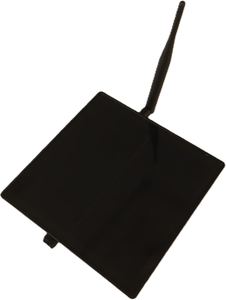 Solar Transport RNode$160 – $225Add to cart
Solar Transport RNode$160 – $225Add to cart
Solar Transport RNode$160 – $225Add to cart
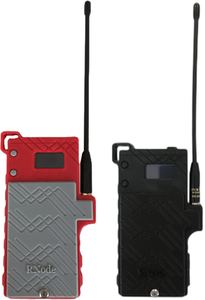 Client RNode Radio$150 – $160Add to cart
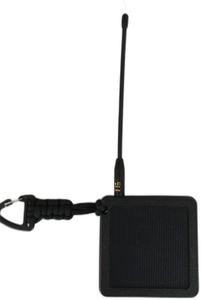 Client RNode — solar$150 – $160Add to cart
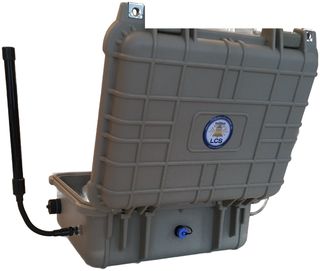 Command Center PRO$750.00Add to cart
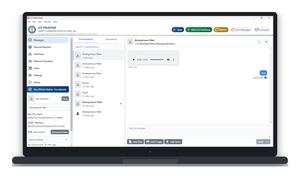 LCS MeshChatFree downloadGet the app
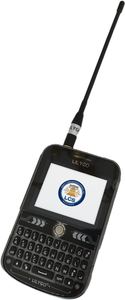 Liberty Deck$185.00Add to cart
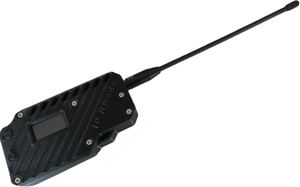 IP RNode$135.00Add to cart
Command Center PRO$750.00Add to cart
Command Center PRO$750.00Add to cart
IP RNode$135.00Add to cart
Command Center PRO$750.00Add to cart
Command Center PRO$750.00Add to cart
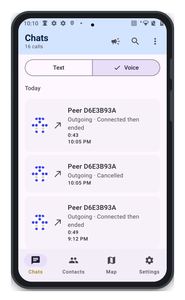 Liberty ChatFree downloadGet the app
LCS MeshChatFree downloadGet the app
Liberty ChatFree downloadGet the app
LCS MeshChatFree downloadGet the app
Liberty ChatFree downloadGet the app
LCS MeshChatFree downloadGet the app
Liberty ChatFree downloadGet the app
Liberty ChatFree downloadGet the app
LCS MeshChatFree downloadGet the app
Liberty ChatFree downloadGet the app
LCS MeshChatFree downloadGet the app
Liberty ChatFree downloadGet the app
LCS MeshChatFree downloadGet the app
- LoRa
- Packet radio (VHF/UHF/HF)
- Wi-Fi
- Ethernet / TCP / IP
- USB-C / Bluetooth / serial
Notice — Radio frequency spectrum is a legally controlled resource and legislation varies widely around the world. It is your responsibility to be aware of any relevant regulation for your location, and to make decisions accordingly.
Get your radio hardware
Built and tested here · free shipping over $100 · add to cart without leaving the page
Two client nodes give you a conversation. Add a transport node somewhere high — a roof, a ridge, a treeline — and you have a network that covers ground. A Command Center PRO turns that into a station the whole household can use, holds messages for anyone who is offline, and bridges the LoRa mesh to Wi-Fi, packet radio and the internet. A 6 dBi antenna on any of them is the cheapest range you can buy.
-
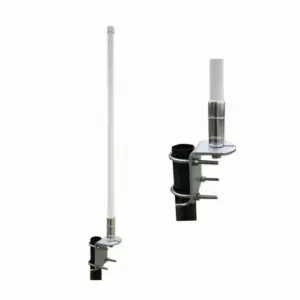
6dBi Antenna with SMA male cable
$70.00 Add to cart -
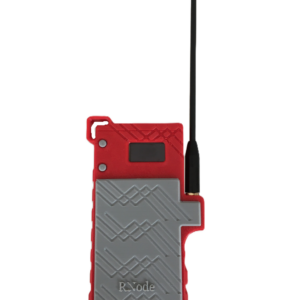
Client RNode Radio
Price range: $150.00 through $160.00 Select options This product has multiple variants. The options may be chosen on the product page -
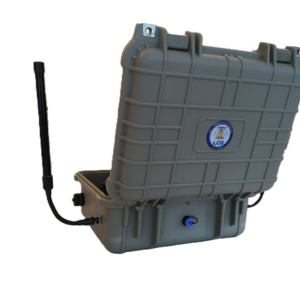
Command Center PRO Gateway
$750.00 Add to cart -
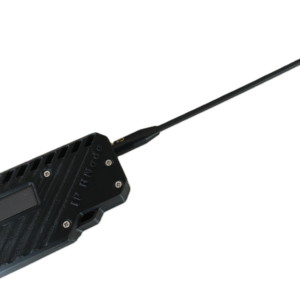
IP RNode
$135.00 Add to cart -
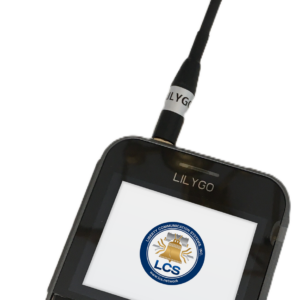
Liberty Deck
$185.00 Add to cart -
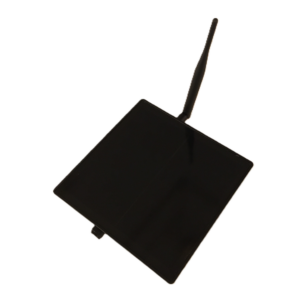
Solar Transport RNode
Price range: $160.00 through $225.00 Select options This product has multiple variants. The options may be chosen on the product page

The cheapest range you can buy
6 dBi Antenna — $70
21.6 in of fibreglass, a 35° vertical beam and an SMA male cable, with a stainless mast bracket that clamps to a pole, a chimney or a ridge board. Put one on a Command Center PRO, a transport node or an IP RNode and the same radio, at the same power, simply reaches further — height and antenna do more for range than anything else you can change.
- Free shipping on every order over $100.
- Command Center PRO — 10% off when you buy two or more.
- Client RNode Radios — Buy 2 and get $10 off each. Cannot be combined with other offers.
- Network Builders bundle — any two client nodes and one large solar transport node takes 10% off all three.
Virginia built · Shipped Nationwide
About Liberty Communication Systems


Liberty Communication Systems, Inc. builds off-grid mesh networking hardware that lets people communicate securely and reliably without depending on anybody’s infrastructure. Our devices run the Reticulum stack across LoRa, packet radio, Wi-Fi, Ethernet and IP at the same time, and they are assembled, flashed and tested here before they ship.
We believe communication should not depend on a tower, a subscription or a company’s goodwill. Whether you are on a remote homestead, working through an outage, or simply would rather not route your conversations through somebody else’s servers, the hardware on this page is built to keep working — and to keep costing nothing to use once you own it.